
iPad
The latest 11th-Generation iPad prices & sales from Apple retailers, plus all the information you need to make an informed purchase
🔥 Best deal right now? $100 off iPads at Walmart
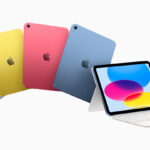
iPad (11th Gen A16) Prices
Check other iPads → Airs | Pros | minis
Links below take you to retailer’s product page.
Colors: Blue, Pink, Silver, Yellow
Prices valid for available colors unless otherwise indicated
iPad (11th Gen)
A16 Models →128GB
WiFi
MSRP
$449128GB
WiFi+Cell
MSRP
$599256GB
WiFi
MSRP
$549256GB
WiFi+Cell
MSRP
$699512GB
WiFi
MSRP
$749512GB
WiFi+Cell
MSRP
$899

$449 $599 $549 $699 $749 $899

Silver--- $579.00 $529.00 $664.00 $614.00 $854.00
Blue$9999 $499.99 --- $664.00 $712.00 ---
Pink--- $569.00 --- $664.00 --- ---
Yellow--- $579.00 $522.00 $664.00 $649.00 $797.99

$449 $599 $549 $699 $749 $899

Free 1-2 day ship
Silver$449 $599 $549 $699 $749 $899
Free 1-2 day ship
Blue$449 $599 $549 $699 $749 $899
Free 1-2 day ship
Pink$449 $599 $549 $699 $749 $899
Free 1-2 day ship
Yellow$449 $599 $549 $699 $749 $899

$329 $9999 $429 $9999 $614 $9999

$349.99 $9999 $499.99 $9999 $9999 $9999

Free ship or pickup$349 $9999 $549 $9999 $649 $9999

WiFi + 5G
+$100 off w/iPhone$9999 $499.99 $9999 $599.99 $9999 $799.99
per month/36 mo.$9999 $13.89 $9999 $16.67 $9999 $22.23

+$280 off w/iPhone$9999 $499.99 $9999 $599.99 $9999 $799.99
per month/36 mo.$9999 $13.88 $9999 $16.66 $9999 $22.22

$9999 $499.99 $9999 $9999 $9999 $9999
per month/24 mo.$9999 $10.42 $9999 $9999 $9999 $9999
Notes:
MacPrices is a proud affiliate partner with Apple retailers
All resellers: Free shipping, sales tax not included
Select price for product details or to purchase
Recent iPad Sales
- Apple’s 11″ A16 iPad Still $50 Off at Amazon & Walmart 6/4/2026
- iPad Deals Hit Walmart — $50+ Off Apple’s Entry-Level Models 5/4/2026
- Best iPad Air Deals Right Now — Up to $100 Off M4 Models at Amazon 4/29/2026
- Apple 11″ A16 iPads $50 Off at Amazon & Walmart – Prices Start at $299 3/30/2026
- Best M4 iPad Air Deals Right Now — Prices Start at $559 3/26/2026
- Updated iPad Price Trackers 3/25/2026
- 13-inch M5 iPad Pros on sale for up to $200 off Apple’s MSRP 3/16/2026
- iPads are on sale starting at $299, $50 off Apple’s MSRP 3/12/2026
iPad Comparison (iPad vs mini vs Air vs Pro)
| Feature | iPad (11th Gen) | iPad mini | iPad Air (M4) | iPad Pro |
|---|---|---|---|---|
| Best For | Everyday use, school, budget buyers | Portability, reading, travel | Most users, productivity, value | Professionals, creators, power users |
| Chip | A16 | A17 Pro | M4 | M4 / M5 |
| Performance Level | Basic to moderate | Moderate to strong | High (near laptop-level) | Highest (desktop-class) |
| Display Size | ~11-inch | 8.3-inch | 11-inch / 13-inch | 11-inch / 13-inch |
| Display Quality | Liquid Retina | Liquid Retina | Liquid Retina (better color & brightness) | OLED / ProMotion (best) |
| Apple Pencil Support | USB-C / 1st gen | Apple Pencil (older gen) | Apple Pencil Pro | Apple Pencil Pro |
| Keyboard Support | Basic keyboard folio | Limited | Magic Keyboard | Magic Keyboard (best experience) |
| Portability | Good | Best (smallest & lightest) | Balanced | Larger / less portable |
| Storage Options | 128GB–512GB | 128GB–256GB | 128GB–1TB | 256GB–2TB+ |
| Starting Price Tier | Lowest | Low-mid | Mid-range | Highest |
| Ideal Use Case | Streaming, browsing, schoolwork | Reading, travel, gaming | Work, multitasking, students | Video editing, design, pro workflows |
iPad (11th Generation) Review — How It Compares to iPad mini, Air, and Pro
The standard iPad remains Apple’s most affordable and accessible tablet, designed to deliver the core iPad experience at the lowest price. While it lacks some of the advanced features found in the iPad Air and iPad Pro, it continues to be one of the best entry points into Apple’s tablet ecosystem.
Design and Display:
The current iPad features a modern flat-edge design with a 10.9–11-inch Liquid Retina display, offering solid brightness, color accuracy, and responsiveness for everyday use. While it does not include advanced features like ProMotion or OLED found on the iPad Pro, it remains more than adequate for web browsing, streaming, reading, and schoolwork.
Performance:
Powered by Apple’s A16 chip, the standard iPad delivers smooth performance for everyday tasks such as browsing, video streaming, note-taking, and light multitasking. While it is not designed for heavy creative workloads, it is more than capable for most casual and educational use cases.
Features and Accessories:
The iPad supports Apple Pencil (USB-C) and keyboard accessories, making it a versatile tool for students and light productivity. However, it lacks support for higher-end accessories like Apple Pencil Pro and Magic Keyboard features available on the iPad Air and Pro.
Battery Life:
Battery life remains consistent across the lineup, with up to 10 hours of use on Wi-Fi, making it reliable for all-day use. :contentReference[oaicite:0]{index=0}
How It Compares to Other iPads:
- iPad (11th Gen): Best for basic use — web browsing, streaming, schoolwork, and casual apps.
- iPad mini: Best for portability. Its smaller 8.3-inch size makes it ideal for reading, travel, gaming, and one-handed use.
- iPad Air (M4): Best for most people. It offers a major jump in performance with Apple’s M4 chip, 12GB of memory, and support for advanced accessories like Apple Pencil Pro and Magic Keyboard. :contentReference[oaicite:1]{index=1}
- iPad Pro: Best for professionals. With the most powerful chips, advanced displays (including high refresh rates and OLED), and maximum storage, it is designed for video editing, design, and heavy multitasking.
Use Case Breakdown:
- Students & Education: The standard iPad is the best value for note-taking, assignments, and online learning.
- Travel & Reading: The iPad mini is ideal for portability and one-handed use.
- Work & Productivity: The iPad Air hits the sweet spot, offering laptop-like performance and accessory support at a lower price than the Pro.
- Creative Professionals: The iPad Pro is the top choice for demanding workflows like video editing, 3D design, and advanced multitasking.
Bottom Line:
The standard iPad is the best choice for budget-conscious buyers and everyday use, but Apple’s lineup is now clearly tiered. The iPad Air offers the best balance for most users, the iPad mini excels in portability, and the iPad Pro is built for professionals who need maximum performance and display quality.
If you’re unsure which model to choose, the decision comes down to how you plan to use your iPad: basic tasks (iPad), portability (mini), performance and value (Air), or professional workflows (Pro).
Quick advice: Buy the iPad Air if you’re unsure—it offers the best balance of performance, features, and price for most users.